TL;DR
Starting music production does not have to mean spending thousands of dollars on software and studio equipment. If you already own a Mac, one of the main costs you might be considering is “Logic Pro.”
Logic Pro is Apple’s digital audio workstation, or DAW. It gives you tools for recording vocals and instruments, making beats, working with MIDI, editing audio, adding effects and mixing complete songs. Apple also includes a large collection of instruments, effects, loops and samples.
But how much does Logic Pro actually cost for a beginner? And should you buy it once or pay for Apple Creator Studio?
If you are completely new to music production, Logic Pro lessons in Sydney can also help you understand the software before you start spending money on additional equipment or plugins.
How Much Does Logic Pro Cost in Australia?
There are currently two main ways to get Logic Pro on a Mac.
You can buy Logic Pro directly from the Australian Mac App Store for “$299.99″ as a one-time purchase.
Check the A$299.99 Logic Pro price on Apple’s Australian App Store
Or you can access Logic Pro through Apple Creator Studio, which is a subscription containing Logic Pro and several other Apple creative applications.
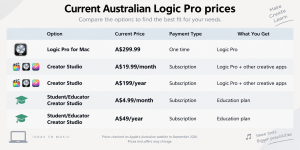
Prices checked on Apple’s Australian website in September 2026. Prices and offers can change.
Check the latest Apple Creator Studio pricing
Apple Creator Studio currently includes Logic Pro, Final Cut Pro, Pixelmator Pro, Motion, Compressor and MainStage, along with premium features in some of Apple’s productivity apps.
So don’t compare $299.99 with $199 and immediately assume the subscription is cheaper. You are paying for different things.
Is It Cheaper to Buy Logic Pro or Subscribe?
This depends mostly on how long you plan to use it.
If you pay the standard $199 yearly Creator Studio price, the cost adds up like this:
| How Long You Use It | Creator Studio Annual | Logic Pro One-Time |
|---|---|---|
| 1 year | $199 | $299.99 |
| 2 years | $398 | $299.99 |
| 3 years | $597 | $299.99 |
| 5 years | $995 | $299.99 |
This is only a simple cost comparison. Creator Studio gives you more than Logic Pro, while the $299.99 purchase is specifically for Logic Pro.
So which makes more sense?
The one-time purchase may make sense when:
✓ You mainly want Logic Pro
✓ You expect to use it for several years
✓ You don’t want another subscription
✓ You don’t need Final Cut Pro or the other Creator Studio apps
Creator Studio may make sense when:
✓ You want Logic Pro and other Apple creative apps
✓ You also edit videos or create other digital content
✓ You prefer a lower initial cost
✓ You qualify for education pricing
✓ You want to use Logic Pro on both Mac and iPad
Apple currently gives new Creator Studio subscribers a one-month free trial. A qualifying new Mac or iPad purchase can also include three free months, subject to Apple’s eligibility conditions.
Simple Rule
How Much Does Logic Pro Cost for Students?
This is one area where the price changes significantly.
Apple currently offers verified university students and educators Apple Creator Studio for:
$4.99 per month
or
$49 per year
Apple says verification is required, and the education offer is currently described as a limited time offer that may end.
Check Apple’s current student and educator pricing
Here is how the annual student price compares:
| Option | 1 Year | 3 Years |
|---|---|---|
| Logic Pro one-time purchase | $299.99 | $299.99 |
| Standard Creator Studio annual | $199 | $597 |
| Student Creator Studio annual | $49 | $147 |
For an eligible university student who is just getting started, $49 per year is worth considering before paying $299.99 upfront, particularly if you also want the other Creator Studio apps.
Just remember that student pricing depends on continuing eligibility and Apple’s offer terms.
Do Beginners Need to Spend More After Buying Logic Pro?
Not necessarily.
One advantage of Logic Pro is that you already get a substantial collection of production tools. Apple includes software instruments, effects, loops, samples, recording and MIDI tools, Flex Time, Flex Pitch, Sampler, Quick Sampler and Mastering Assistant.
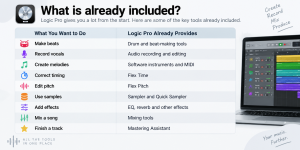
This means you do not need to start buying third-party plugins immediately.
Your additional costs will depend more on what you want to record.
For example, someone making music mainly with software instruments might start with just a Mac and headphones. Someone wanting to record vocals may eventually need a microphone and audio interface.
These are some possible extra costs later:
☐ Headphones
☐ MIDI keyboard
☐ Microphone
☐ Audio interface
☐ Studio monitors
☐ External storage
☐ Third-party plugins, only if you actually need them
You don’t have to buy everything on this list when you start. Just buy if your really need it.
What Should I Check Before Paying for Logic Pro?
Before clicking Buy or Subscribe, go through this checklist.
First of all, check your mac by seeing this list:
☐ Is your Mac compatible with the current version?
☐ Is your macOS version supported?
☐ Do you have enough free storage?
☐ Will your existing audio equipment work with your Mac?
The current standalone Logic Pro listing requires 6 GB of available space for a minimum installation or 44 GB or more for the full Sound Library.
Apple also states that the current one-time-purchase Logic Pro requires macOS 15.6 or later. The Creator Studio version for Mac requires macOS 15.6 or later and Apple silicon.
Second, checklist your budget before buy or subscribe logic pro.
☐ Can you comfortably pay A$299.99 upfront?
☐ Would A$19.99 per month suit your budget better?
☐ Are you eligible for A$4.99/month student pricing?
☐ How many years do you expect to use Logic Pro?
Third, see what you actually need.
☐ Do you only want Logic Pro?
☐ Do you also need Final Cut Pro?
☐ Will you use the other Creator Studio apps?
☐ Do you want Logic Pro on an iPad as well?
☐ Have you tried the free Creator Studio trial?
If you answered yes mainly to the Logic Pro questions, compare the standalone purchase carefully.
If you answered yes to several of the creative-app questions, Creator Studio becomes more relevant.
Is Logic Pro Worth the Cost for a Beginner?
For a beginner who wants to learn music production on a Mac, $299.99 gives you a large music-production toolkit in one purchase. You can make beats, record audio, work with MIDI, use virtual instruments, edit recordings, add effects and mix complete tracks without immediately buying additional production software.
But you now have more than one way to pay.
$299.99 once may suit someone who only wants Logic Pro and expects to keep using it.
$19.99 per month or $199 per year may suit someone who also wants Apple’s other Creator Studio apps.
And eligible university students and educators should definitely check the current $4.99 monthly or $49 yearly education option before making a purchase.
You don’t need to buy every plugin or piece of studio equipment at the same time either. Start with Logic Pro, learn the tools that are already included, and add equipment when your music actually requires it.
For beginners who would rather have someone guide them through recording, editing, MIDI and mixing, Sydney Logic Pro lessons can also provide a more structured way to get comfortable with the software.
 September 30, 2026
Where Could I Find an Affordable Clarinet Teacher in Sydney?
TL;DR A limited monthly budget can still leave you with options for clarinet lessons in Sydney. Start with the price… September 26, 2026
Where to Actually Look Before You Buy an Instrument
The obvious first search usually isn't the right one. The instinct is almost always the same. A lesson gets booked,… September 23, 2026
What Should I Learn First on Piano? A Beginner’s Step-by-Step Guide
TL;DR Start by learning the keyboard pattern, a small group of notes, finger numbers and a steady beat. Practise a… September 23, 2026
How Much Does Logic Pro Cost for Beginners?
TL;DR Logic Pro is Apple's music production software for Mac. In Australia, Logic Pro for Mac costs $299.99 as a…